RFC: LLDB Statusline

Objective

Add a statusline to command-line LLDB to display progress events and other information related to the current state of the debugger. The statusline is a dedicated area displayed the bottom of the screen. The contents of the status line are configurable through a setting consisting of LLDB’s format strings.

Motivation

LLDB’s current implementation to display progress events inline has several issue and limitations. The majority can be traced back to the lack of synchronization of stdout. The result is that progress events and output from the inferior or LLDB get mangled. LLDB’s abstractions over output streams provide no or limited synchronization, and the situation is further complicated by the IOHandler (including IOHandlerEditline) which assume they have control over the whole terminal screen. Although it would be possible to fully synchronize all of LLDB’s output, it would add significant overhead (due to locking) and complexity (due to all abstractions having to synchronize with each other).

Instead, we have tried to mitigate these issue by limiting the places we emit progress events (e.g. by avoiding emitting progress events asynchronously) and by attempting to limit the amount of updates (i.e. by shadowing shorter running progress events).

These issues has hurt the adoption of new progress events. We had a few situations where new events were added but never shown (because of shadowing) reducing their value. Even worse, we had a few situations where new progress were emitted asynchronously (from a thread pool) and would get interleaved with process and LLDB output.

Proposal

To avoid the issues mentioned above and without having to synchronize between, I propose to reserve a dedicated part of the screen (i.e. the bottom row of the terminal). This relies on a terminal feature that allows you to adjust the scroll window through ANSI escape codes. The reduced scroll window ensures that no output is ever shown there, unless the cursor is moved there explicitly through ANSI escape characters, which is how the statusline is redrawn.

When the statusline is enabled, a dedicated thread is responsible for periodically redrawing the statusline. I found 4 FPS to be the best trade-off between performance and latency.

Although the statusline is primarily motivated by showing progress events, other information can be displayed here as well. Over the years we’ve seen requests from users who want to customize their prompt to include information pertaining to the state of the debugger. The statusline would be a natural place to display that.

The statusline should be configurable through a setting. I’m proposing that we reuse the format strings that allow customizing thread and frame formats. Using the same infrastructure means that when we add support for more formats, both features benefit from it.

Prototype
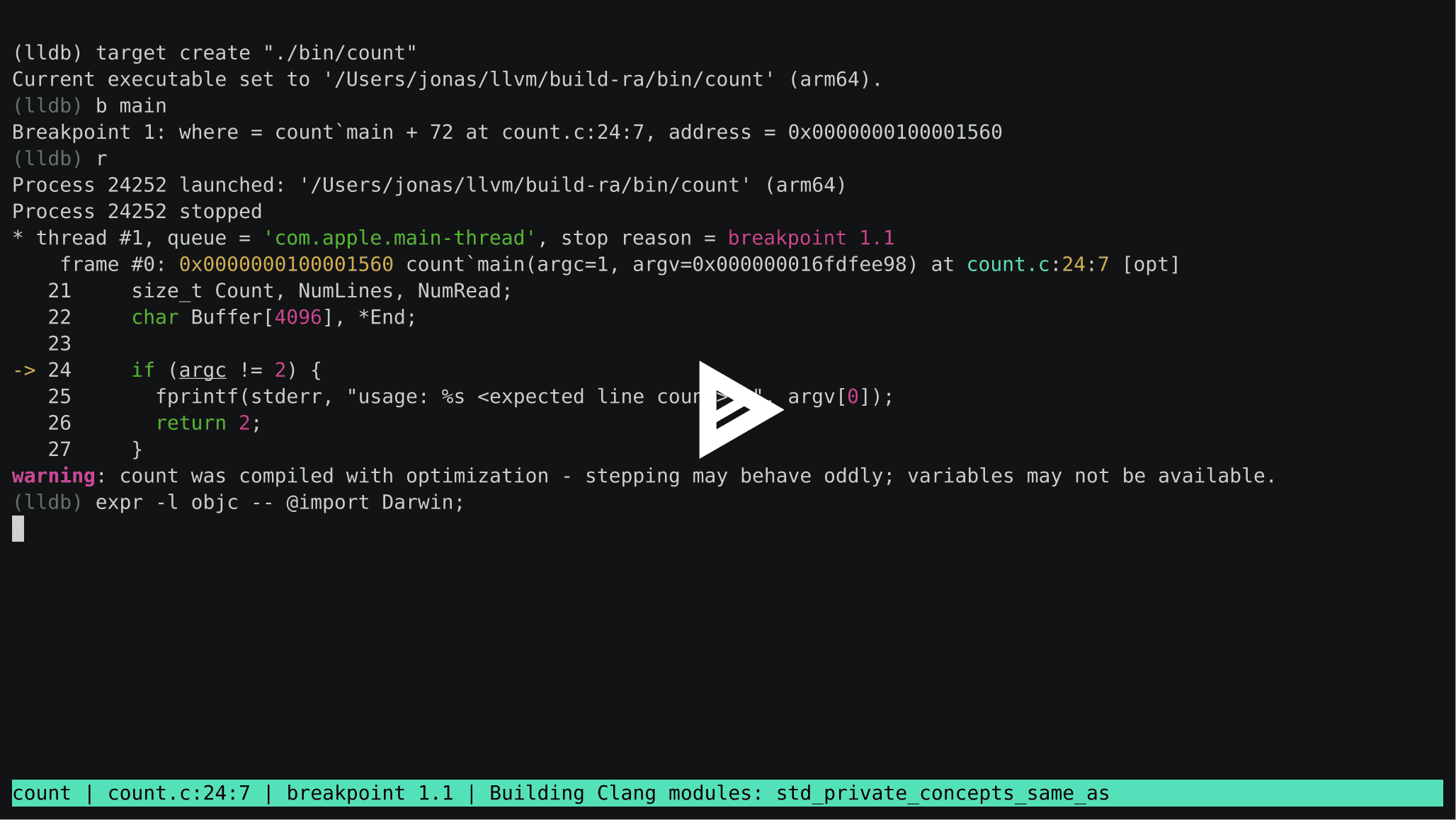
Video: LLDB Statusline - asciinema.org

Open Questions

Statusline as the default

The statusline feature can be disabled with a setting:

(lldb) settings show show-statusline
show-statusline (boolean) = true

Do we want the statusline to be on by default or opt-in? The answer likely depends on the next question below.

Replacing the current progress events

I propose that the statusline supersedes the current inline progress events. I would strongly prefer not having to maintain both. If we have to keep supporting the existing way of displaying them, the limitations mentioned in the motivation continue to hurt progress event adoption.

Configuration Format

I propose configuring the statusline with a new option value called format-string-list. The motivation for making this a list, rather than a single string is the current implementation of the FormatEntity class. If we fail to display one variable in the format string, the whole thing fails. This is problematic for the statusline because variables are not always available. For example, displaying the current source file doesn’t work if the process isn’t stopped.

With a format string list, the setting looks like this:

(lldb) settings show statusline-format
statusline-format (format-string-list) =
  [0]: ${module.file.basename}  [1]: ${line.file.basename}:${line.number}:${line.column}  [2]: ${thread.stop-reason}

Unavailable variables are skipped and the separator hidden.

I also propose that we do not include the progress events as a format string, but instead always append it, if the existing option show-progress is enabled:

(lldb) settings show show-progress
show-progress (boolean) = true

Pull Request

Draft PR with my prototype implementation: https://github.com/llvm/llvm-project/pull/121860

4 Likes

In the case of a status line, having the various elements in the string list shift around as the contents of each changes size could be distracting. It might be handy to have a way to allocate space to each of the members of your format-string-list so they wouldn’t do that.

I’m also not sure eliding unavailable format entities is a good choice. This is for quick visual scanning, and if I have to figure out what the nth element actually is by counting the missing elements, it would make that harder.

I think this is neat and isn’t any further departure from having useful output in the terminal’s scrollback buffer than the existing ephemeral progress updates are, so I’m supportive of this!

Couple of random questions:

  • Have you tested the performance of this over a slow connection?
  • It seems like this needs positioning and inverted video, whereas the progress updates only needed backspaces. Are there any terminal types that we could support with the progress updates, but don’t support the status bar? Do we care?
  • Why are the | characters not part of the format specification? Or are they?
  • (Very optional) It might be useful to have an expanding spacer format specifier so some elements could be displayed right-justified.

I like the idea of extending LLDB’s format strings to support a min/max length specifier like printf/formatv style strings so folks could opt-in or out of this behavior.

I have played with it over SSH and in not-particularly-fast terminals (without naming names). However, if anything I expect this to be more perofrmant than the current implementation of the progress events because the refresh rate is fixed at 4 FPS.

I don’t think the scrollback window is any more exotic than the ANSI escape codes we already use in Editline. We could be more diligent about checking termcap, but then I think we should do it everywhere, not just for the statusline. My gut feeling is that the vast majority of our users is using a modern terminal that it’s not really worth it. I don’t remember ever seen a bug report for the control characters we use in our Editline wrapper.

It would be easy to make the separators configurable as well. In the open questions section I explained why the whole status bar is not a single string (i.e. the internals of format entry + the fact that not everything is always available).

Yeah, similar to Jim’s comment I think that would be a useful addition and general improvement to the format strings.

How would the status line deal with concurring progress reports ?

Does it follow the current model where the on-going report hides newer ones ? I know this approach isn’t idea but I was hoping we would be able to show different progress reports at the same time by stacking them (like a GUI app would do).

It seems to me that the status line would prevent that unfortunately.

I think this is an interesting feature. I was initially worried that it would interfere with terminal scrolling, but it seems to work just fine. Control-Z/SIGTSTP support seems to be missing from the prototype (the status line stays on even after breaking out to the shell) but I have no doubt this can be fixed.

That said, I have an issue with the opening premise – that this improves the situation w.r.t output synchronization. In a way, I think all these cursor movements could make things worse. Without any synchronization, what’s preventing something from writing to the terminal while the cursor is in this special region of the screen? I don’t think there’s a substitute for more discipline in handling a shared resource (the screen).

I’m also a bit worried about the impact of re-evaluating the status line several times per second. Could we have a way to update it only when something has changed (or is likely to have changed)?

1 Like

You’re correct, thanks for pointing that out. I’m conflating two issues in the motivation.

I started by trying to fix the current model by adding more synchronization to the debugger’s output stream. With that in place, the progress events and the process output was still interleaved, but it wasn’t due to synchronization of stdout. The problem was that the current implementation relies on a carriage return (\r) to overwrite the progress event in case we don’t clear it before new output arrives. Let’s say we have something like this:

[1/10] A random progress event that's pretty long.
Short process output!ess event that's pretty long.

The statusline avoids this situation by having exclusive control of that one row of the screen. You’re correct that you still need synchronization of the output streams.

I have some code locally that throttles the statusline thread when no new data came in. It’s not part of the prototype PR because I didn’t verify that the statusline was notified for every piece of information supported by the format strings. It also slightly complicates things if you want to refresh on a regular cadence (to avoid flickering). But nothing prevents us from adding that in the future.

It’s different form the current approach that we show the most recent one, rather than the oldest ongoing one (what I refer to as shadowing). The reason that’s possible with the statusline is because we control the update frequency. If we try to do that with the current approach, we get a lot of flickering.

Technically that would be possible. The statusline doesn’t need to be one row high. We could make it grow dynamically based on the number of status reports. The nice thing about the statusline is that it fully controls that area of the screen.

That makes sense. Thanks.

That’s true, but it’s also easier to design something from the start than trying to add it afterwards.

Also, my other reason for wanting to do it this way is because I’m not particularly thrilled with the idea of a statusline thread. Through the format strings, the status line can call into pretty much any part of lldb, and it will do so at completely random times (well… they’re regular w.r.t the wall clock, but random w.r.t everything else that lldb may be doing). While this may be good for fuzzing lldb, I’m not looking forward to debugging issues that happen because the status line causes something to be lazily computed on a different thread than usual.

Doing this work in response to some sort of an event would force at least some level of determinism to it, particularly if this happens on one of our existing background threads such as the event handler thread. I would really like if this work happened there, for several reasons:

  • the event handler thread already writes to stdout, which means there’s one less potential writer to synchronize with
  • the thread already handles most (all?) of the events that could cause a status line to be invalidated (in particular, it already prints the progress events), which makes it easier to update the status line at the right moment (no need for additional synchronization primitives)
  • the work that the thread does already sort of has the purpose of displaying the “status” of the debug session, and we may want to add some sort of interactions with the status line in the future. For example, I could imagine skipping or somehow modifying the “Process XXX stopped/resumed” messages if this information is displayed on the status line. All of this would be a lot easier if this were to happen on the same thread.

Thanks for the input. I agree with all your arguments. Let me see what this would look like when run from the event handler thread.

1 Like

I’ve updated the prototype:

  • The statusline now runs on the default event handler thread.
  • The statusline separator is now configurable.
  • The statusline now supports Control-Z/SIGTSTP correctly.
  • The statusline now shows the target file base name by default (instead of requiring a process to exist).

A few caveats:

  • There’s no throttling of showing progress events. Shouldn’t be hard to add but I’m also not sure it’s necessary: LLDB looks snappy this way :slight_smile:
  • There’s a bug where Editline clears the whole screen, including the statusline. The previous implementation hid the bug by redrawing the statusline before you’d notice. This needs to be fixed before we can merge this.

Outstanding questions:

  • Are folks happy with using a format string list to configure the statusline? If so I’ll put up that commit as a separate PR and we can start reviewing that.
  • I’m considering the format string improvements suggested here as things that can be improved in the future and not blocking the feature itself. Does anyone disagree?
  • How do people feel about the statusline replacing the current way we show progress events (and making it the default) versus keeping both around?

SGTM

I guess that could change if you use some of the fancy format strings features to display variable values and whatnot, but yes, I agree this should be possible to add this later.

I think it would be good to settle the question of the type of the setting. From my side, I think that the format-string-list concept is rather clunky, and I’m a bit puzzled as to why it is necessary. According to this it should be possible to not display just a part of the format string if something fails. If we can make that work, then this would also settle the question of “should the separator be configurable” (answer: it will be a part of the format string). I think that having a way to right-justify or put a fixed width on some field can be done later, and that it would be a useful format string feature overall.

I would really like to not keep both of these around.

2 Likes

I’ve been iterating with @labath on the PR (thank you!) and I think this should be close to ready. I’d love if others here could take a look at the PR as well.

Tried out the status bar recently, and while at first I didn’t love the ansi negative, I do really like the status bar as a feature, especially the configurability. I do have a concern about if we remove the old progress dialogue, and the status bar is not configured for Progress events, will those events not be displayed to the user?

I think the only weakness of the status bar is because it’s completely user configurable we can’t guarantee that it is configured without a non-zero cost check.

Hey, I noticed while using this that the binary name doesn’t have any padding in the status line which causes it to be at the edge of the terminal window. This is what it looks like:

Does anyone feel strongly about adding some breathing room around the executable name in the status line ?

Yeah, the reverse video effect doesn’t look great in my terminal either, but inverting the foreground and background colors is the only effect that is guaranteed to look reasonable in any terminal color scheme as it doesn’t introduce any new colors, while still making sure the statusline has a background.

Yes, the statusline replaces the inline progress events. The inline progress events had many downsides, some of which I’ve listed in the original RFC. I’ve improved the synchronization of the stdio streams, but the real problem is that in order to clear progress events, you need to have state and know what’s currently displayed on the terminal. Without having full control of the screen (e.g. what ncurses does), there’s no way to guarantee nobody came in and printed something between the start and end event. As a result, we had to implement “shadowing” (i.e. progress events emitted while another progress event was active was never displayed) which was hurting the adoption of new events (as they wouldn’t get displayed on the command line).

I spent about a week in December trying to improve the inline progress events before I came to the conclusion that it’s really not doable without having all stdio going through whoever manages the progress events. The statusline sidesteps this by having a dedicated area which we have full control over.

1 Like